Learning how to find top-performing videos on a TikTok account takes more than opening the profile and watching the pinned row. Pins are editorial choices, not a performance leaderboard. Recent posts have not had equal time to collect views, while one old viral outlier can make the rest of the account look weaker than it really is.
A useful answer comes from a small, consistent dataset: collect the latest posts, sort the public metrics, establish the account’s normal range, and then watch the videos that exceed it. This guide stays inside one public account. If your question is how several brands compare, use the separate TikTok competitor audit workflow.

Quick answer: how do you identify an account’s best TikToks?
Scan the account’s 24 most recent public videos, export the results to CSV, and sort views, likes, comments, and shares separately. Calculate the median view count, compare each post with that baseline, and group videos by age. The strongest research candidates are posts that outperform the account’s normal level and share a creative pattern that appears more than once.
You can collect the first page with the TikTok Profile Scan. It returns recent posts first so you can get an answer without fetching an entire history. Load another 24 only when the first sample is too narrow; a full scan is appropriate for archival work, not every performance question.
| Signal | What it can tell you | Important caveat |
|---|---|---|
| Views | How widely the post was distributed | Compare posts of a similar age |
| Likes | Lightweight positive response | A like is not a business outcome |
| Comments | Conversation and questions generated | Read quality, not just quantity |
| Shares | Whether people found it worth passing on | Context varies by content format |
| Post date | Time available to accumulate activity | Growth is not perfectly linear |
Why pinned videos do not answer the question
A creator might pin an introduction, an offer, a personal favorite, or an old announcement. That post may be strategically important while sitting below the account’s median reach. Another pinned video may be a huge historical hit produced before the channel changed its topic or production style. Both are useful context, but neither should define current performance by itself.
The reverse problem happens with the newest grid positions. A video published this morning has not had the same opportunity as one posted three weeks ago. TikTok can distribute a post in waves, so a simple top-to-bottom profile review mixes different exposure windows. Your workflow must keep the post date beside every metric.
Step 1: Start with the latest 24 posts
Twenty-four posts create a practical first sample: enough variety to reveal recurring series and hooks, but small enough to watch manually. On an account publishing daily, that sample covers roughly a month. On an account posting twice a week, it may represent a quarter. The number of posts and the posting cadence should always be interpreted together.
Enter the username or profile URL, let the first page complete, and note the collection date. If the account recently changed niche, product, host, or format, recent posts are often the only relevant ones. If it publishes irregularly or the sample contains several old pins, choose “Scan 24 more” and reassess with up to 48 posts.
When is a full profile scan justified?
Use a full scan when you are documenting an account’s evolution, preparing a backup, or comparing distinct historical periods. It is rarely necessary just to find what is working now. Pulling years of posts can dilute current signals with formats, audiences, and platform conditions that no longer apply.
Step 2: Build a clean CSV workspace
Export the scanned results, then open the file in Google Sheets or Excel. Preserve the video URL or ID, caption, publish date, views, likes, comments, and shares. Add a column for account name even though you are reviewing one profile; it keeps the sheet reusable and prevents confusion if you later add a second dataset.
Sort each public metric independently. A post that ranks near the top for views, comments, and shares is a stronger candidate than one leading on likes alone. Do not download every file at this stage. After the shortlist is clear, use the batch TikTok downloader to save only the videos you have a legitimate reason to review offline.
Step 3: Establish the account’s median performance
The arithmetic mean is easy to distort. Imagine 23 videos around 15,000 views and one at 1.5 million. The average leaps upward even though a typical post remains close to 15,000. The median—the middle value after sorting—gives a more stable description of the account’s usual result.
Use the spreadsheet MEDIAN function on the view column. Then add a “views vs median” column by dividing each video’s views by the median. A score of 2.4 means that post reached 2.4 times the sample’s midpoint. This is not an official TikTok score; it is an audit aid that makes unusually strong posts easy to spot.
Flag posts above 2x, then review the band between about 1.3x and 2x. A cluster of moderately strong posts using the same format may be more actionable than a single extreme viral event. Repetition suggests a mechanism the creator can reproduce, while an isolated outlier may owe much of its reach to timing or an external event.
Step 4: Account for post age without overengineering it
Create a simple age field based on the collection date. Group posts into useful windows such as 0–7 days, 8–30 days, and over 30 days. Compare within those windows before you rank everything together. Views per day can help surface fast starters, but do not treat it as a forecast: distribution usually arrives in uneven waves.
Cadence changes the meaning of the result too. An account publishing four experiments a day may expect most posts to land below its median while producing several winners each week. A creator releasing one polished video weekly has a different production model. A raw ranking cannot tell you which model is better without that context.
Step 5: Create a compact performance scorecard
A scorecard prevents you from choosing videos based on one exciting number. For each candidate, record views vs median, age band, share position, comment position, format, and a one-sentence reason it matters. Keep the metric columns separate instead of blending them into a mysterious weighted score that nobody can explain.
Public metrics represent different behaviors. Views reflect distribution; comments can reveal confusion, disagreement, or purchase questions; shares often signal utility or identity. A strong educational post may win on shares without leading likes. A provocative opinion may dominate comments but be a poor model for a risk-sensitive brand.
TikTok’s own video-play metric documentation shows why definitions matter in campaign reporting. A public profile exposes a much smaller set of data than an account analytics dashboard, so your scorecard should describe observed signals—not claim access to watch time, retention, or conversions.
Use TikTok One’s Top Content guidance as trend context, while keeping the selected profile sample as the basis of your ranking.
Step 6: Watch for the creative pattern behind the numbers
Now open the five to ten strongest candidates. Write down the first-three-second hook, promise, video format, pacing, caption, hashtag role, audio type, length, proof, and call to action. Do the same for a few median posts. Comparing winners only creates selection bias; ordinary posts reveal what actually changed.
Look for mechanisms rather than details to copy. If several winners show the finished result before explaining the process, the insight is “lead with outcome,” not “repeat this exact scene.” If short checklists earn disproportionate shares, test whether the audience values compact reference material. If a reply-to-comment series repeatedly beats the median, the community’s own questions may be the account’s strongest research source.
- Hook: result first, common mistake, direct question, tension, or surprising claim?
- Format: demonstration, talking head, list, story, comparison, or comment reply?
- Proof: screen, product in use, example, data, testimonial, or no evidence?
- Pacing: when does the first visual or verbal change occur?
- CTA: save, share, comment, follow, click, or watch the next part?
Step 7: Turn the winners into a useful shortlist
Separate the shortlist into repeatable winners, unusual outliers, and videos relevant to your current goal. Each row should say what you want to learn, not merely “good video.” Examples include “visual proof appears before product explanation,” “three objections answered in 20 seconds,” or “comment question becomes the opening frame.”
If the account is yours, keep clean source copies rather than relying on public downloads. The guide to downloading your own TikTok videos explains a safer ownership workflow. For anyone else’s content, a public URL and public metrics are not permission to republish, edit, or use the footage in ads.
What public profile data cannot prove
A profile scan cannot see average watch time, completion rate, retention curves, traffic sources, audience geography, paid support, revenue, or production cost. It also cannot know the business objective behind each post. A lower-view tutorial may generate qualified leads; a broad viral joke may produce no meaningful action.
Metrics are snapshots and can continue to rise after collection. Deleted, private, friends-only, or unavailable posts will not appear. Treat the ranking as a method for generating research hypotheses, then validate those hypotheses with first-party analytics when you control the account.
Common mistakes to avoid
Do not mix brand-new and year-old posts in one absolute ranking, use the mean as the only baseline, or build a strategy around one viral outlier. Do not label a post “high engagement” without looking at what the comments say. Most importantly, do not confuse the number exported with full-profile coverage: CSV and “Select all” apply only to posts already scanned.
A good workflow stays legible. Anyone opening your sheet should understand the collection date, sample size, age bands, median formula, and why each shortlisted video was selected. If the method cannot be explained in two minutes, simplify it.
FAQ
Can I find an account’s top TikToks without logging in?
Yes, for a public profile. A private account or restricted post cannot be legitimately scanned through this workflow.
Are 24 posts enough for a reliable answer?
They are enough for a recent snapshot. Add another 24 when cadence is low, results are unusually volatile, or you need a broader time window.
Should I rank by views or engagement rate?
Begin with views and the account median, then inspect comments and shares in context. No single public ratio identifies the “best” post for every goal.
Why use median views instead of average views?
The median resists distortion from one extreme viral post and therefore describes the typical middle of the sample more accurately.
Can I reuse a top-performing video I find?
Analysis does not grant usage rights. Save or republish only content you own or have permission to use, and keep source attribution in your research notes.
Conclusion
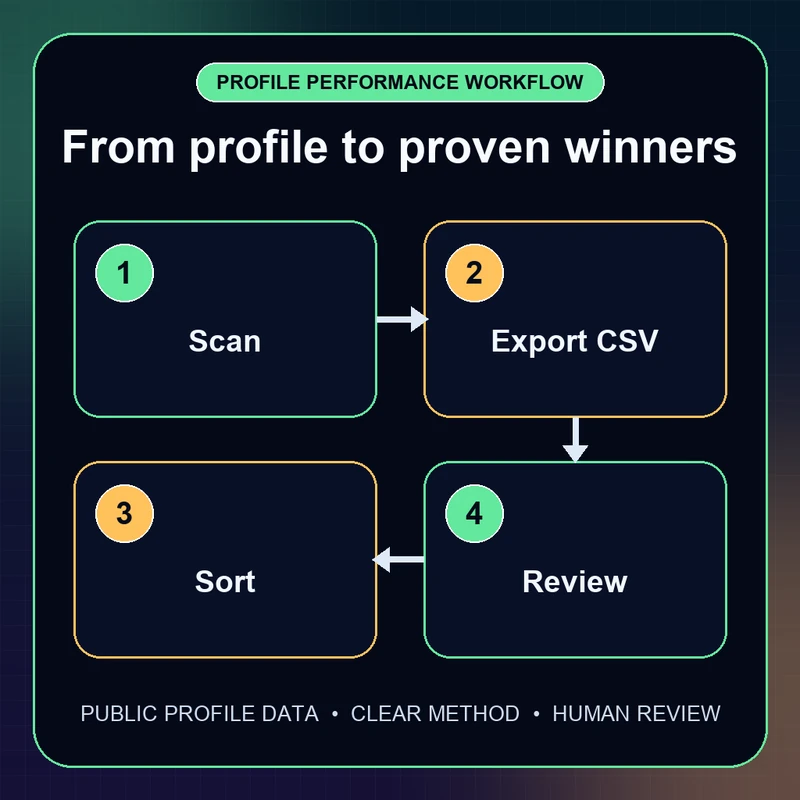
The most dependable way to find top-performing videos on a TikTok account is Scan → Export CSV → Sort → Review. Start with 24 recent posts, compare each one with the median and a fair age group, then study the creative patterns shared by several winners. You will get a shortlist grounded in the account’s actual baseline rather than pins, recency, or one lucky outlier.
![How to Vet a TikTok Influencer Before a Brand Collaboration [2026]](/_next/image?url=https%3A%2F%2Fr2.cliptool.app%2Fblog-thumbnails%2Fhow-to-vet-tiktok-influencer_800.webp&w=828&q=75)
![How to Analyze a Competitor’s TikTok Account: 30-Video Audit [2026]](/_next/image?url=https%3A%2F%2Fr2.cliptool.app%2Fblog-thumbnails%2Fhow-to-analyze-tiktok-competitors_800.webp&w=828&q=75)
![How to Repost a TikTok Without the Watermark: Reels, Shorts & Other Accounts [2026]](/_next/image?url=https%3A%2F%2Fr2.cliptool.app%2Fblog-thumbnails%2Fhow-to-repost-tiktok-without-watermark_800.webp&w=828&q=75)